


Overview
Sony Xperia Z is best of Sony in smart phone with the world's sharpest 5" display. It has the worlds first image sensor with HDR video for smartphones. It gives stunning photos and videos in any light from its 13 mega pixel camera.It has the highest level of water resistance in a smart phone
Features
Display
Feel like you’re there with the razor sharp and super bright full HD screen. Xperia Z brings you the highest level of HD available – 1080 progressive scan, for incredibly crisp pictures and no jagged edges. Expertise from our BRAVIA® TV engineers goes into our mobile screens, to bring you the same quality you’d expect from a top quality HDTV. The 5” full HD Reality Display also has very high pixel density – 443 pixels per inch, for razor sharp pictures – and superior brightness. And with the wide colour gamut it gives you the widest colour spectrum, so you can view every detail in vivid colour.
True Screen intelligence – Mobile BRAVIA® Engine 2
The second generation of our acclaimed Mobile BRAVIA® Engine, Mobile BRAVIA® Engine 2 delivers an even better viewing experience by adding new real-time contrast optimisation to the sharpness enhancement, high-quality colour management and noise reduction. Mobile BRAVIA® Engine 2 is also able to analyse content type and adjust the image accordingly. Adding Mobile BRAVIA® Engine 2 to the Reality Display makes for an intelligent screen – one that adapts automatically to display your content in the best way.
(1) Contrast enhancement
Contrast in images and video is enhanced by making the darkest parts slightly darker, which brings out details in the picture.
(2) Colour Management
Colour saturation is increased for specified colour ranges, which makes the colours deeper and more vivid. And the intelligent Mobile BRAVIA® Engine 2 software reproduces skin colour exactly as it appears to the naked eye.
(3) Noise reduction
Distortion and noise is reduced when streaming low-quality video from online sources, such as YouTube. Noise is reduced both to individual frames and between frames, for clearer viewing.
(4) Sharpness filter
Mobile BRAVIA® Engine 2 applies a sharpness filter to increase the overall detail level in the image. This is done by enhancing the edges and contrast without increasing noise.

Less reflective, more responsive – OptiContras & Direct Touch
We’ve eliminated a layer of air in the construction, bringing the touch panel closer to the display. This OptiContrast™ panel makes for less reflection and clearer viewing – even in bright sunlight, as well as creating a seamlessly black surface when the phone is turned off.
By eliminating the sensor layer and integrating the sensor on the lens, we’ve managed to increase the responsiveness of the screen. So your touch is more effective and the experience is more intuitive.
(1) Lens
(2) Removed air layer
(3) Sensor layer
(4) Display

Building something bright and brilliant
BRAVIA engineers have discovered that we remember colours more vividly than they really are. That’s the kind of knowledge they put into creating brilliant colours for our screens. Get a peek at this precision craftsmanship in the video.
Camera
Exmor RS™ for mobile – the world’s first image sensor with HDR video for smartphones
HDR for photos and videos captures natural colours in any light. HDR (High Dynamic Range) is an imaging technology used to capture clear photos against strong backlight. With HDR, the camera captures the same image at different exposure levels and layers them to create one optimised photo.
Xperia Z introduces HDR to video, so that you can film even in high contrast situations, like in front of a window or with the sun behind your subject.

Always the right setting – Superior Auto
Now it’s always easy to get a great shot. With Superior Auto, you don’t have to know the ins and outs of camera settings to make use of them. In Superior Auto mode, the camera combines Scene Recognition with high quality and high performance image processing technology (HDR and noise reduction) to automatically shoot with the optimal settings. And your device is automatically optimised for 36 different scenes, so you always get the best shot.
Stunning shots in any light — 13 MP camera with Exmor RS™ for mobile
The 13 megapixel camera is built with the same modules as leading Sony cameras. Exmor RS™ for mobile is an evolution of our Sony image sensor technology, with a next-generation BSI light sensor. By adopting the technology of luminance and colour noise reduction, we’ve created a camera that snaps highly detailed shots with low noise – even in challenging lighting conditions. You’re now also able to reproduce objects in more vivid colours and capture night images and faces in stunning clarity. Exmor RS™ for mobile includes HDR video, for clear shots even when your subject is backlit.
World’s only dual Exmor R for mobile camera
We’ve included the Sony Exmor R™ for mobile sensor on the full HD front camera, so you can take self-portraits or chat in lowlight conditions as well. And both the front and rear cameras support HDR photos.
Quick benefits:
- Sweep panorama
- Modeless UI gives you instant access to both camera and video mode
- Take pictures in video mode
Design & Durability

Minimal yet distinctive – OmniBalance design
With Xperia Z, we introduce our new OmniBalance design. The design is focused on creating balance and symmetry in all directions. Xperia Z has subtly rounded edges and smooth, reflective surfaces on all sides, which are held together by an innovative skeleton frame.
Both the front and back are made of glass, with a seamless surface. Together with enhanced reflection coating on the top, bottom and sides, Xperia Z actually mirrors the world around you. OmniBalance design balances technology vs. design, letting you get so totally immersed in the content that the hardware disappears.

Quality craftsmanship
Xperia Z was designed in collaboration with Sony consumer electronics experts, for quality craftsmanship and consistent attention to details. Only premium materials were used throughout, like aluminium for the power and volume buttons and durable tempered glass for the front and back.
Super slim
We’ve eliminated a layer of air and brought the display closer to the lens, for added touch sensitivity and a smaller size. This construction, along with a new component layout and skeleton frame allows for a slimness of 7.9 mm.
Premium design, outside and inside – Sony unified UI
Whether you’re on a Sony smartphone or tablet, you’ll meet a consistent user interface on your devices and in all your Sony Media apps.
Water and dust resistant
We tested the Xperia Z to make sure it can keep going even after 30 minutes under water. It can even withstand water jets. The high IP55 & IP57 rating means you can use it in the rain, take photos by the pool and easily clean it off from everyday spills and dirt.
We even put Xperia Z in a dust chamber for rigorous testing, to make sure its operations were unaffected.
Quick benefits:
- Water resistant up to 1 meter
- Resistant to water jets
- Dust resistant

Connectivity
One-touch connectivity from Sony
Sharing with friends and connecting your world has never been easier. Based on NFC (near field communication), our One-touch functions connect one device to another in a single tap. No wires, cables, or fiddling with settings necessary.
One-touch mirroring
See photos from your phone on your TV. Simply touch your smartphone to the remote from your BRAVIA® TV to activate screen mirroring.
One-touch backup
Whether you take pictures on your Xperia Z smartphone, tablet or camera, now you can store them in the same place. The Sony Personal Content Station™ is a wireless hub for photos and videos.
One-touch listening
Play the music on your smartphone through a wireless speaker or wireless headphones.
One-touch sharing
Share photos, music and more between two phones, or between your phone and an NFC-enabled laptop.
How One-touch sharing works
From your smartphone to the big screen
Want to share your memories on the big screen? Or go from headphones to speakers? “Throw” content from your smartphone to your Wi-Fi-enabled TV through screen mirroring or DLNA, or send your tunes to a speaker via Bluetooth. Using “Throw”, your device finds the best way to wirelessly connect your smartphone to other devices. With an MHL cable, you can also mirror your phone’s full user interface on your TV and enjoy movies, games and more while charging.
Smart Connect
Make your life simpler by setting up how your smartphone behaves when it connects to other devices. Open your music player when you connect your headphones, organise your SmartWatch, or activate your alarm clock when your phone touches the charging dock. Smart Connect is the software that lets you manage all your smart accessories.
Connect and drive
Xperia Z supports MirrorLink™, which means you’re able to project your Xperia display onto your A/V receiver and stay safely connected while you drive. Hook up Xperia Z to your Sony MirrorLink™ A/V receiver and use the touch screen on your dashboard to access maps, music, your phone book and more.
Processor & Battery
Lightning speed performance – Quad-core processor
We’ve matched the latest Sony software with the powerful Qualcomm® Snapdragon™ S4 Pro processor. This advanced quad core processor gives you maximum performance and speed without draining your battery – run multiple apps simultaneously, surf the web with no loading time, and stream videos without a break. The Snapdragon S4 Pro processor is asynchronous, which means each core is powered up and down independently. So you get the precise amount of power when you need it, without wasting power when you don’t.
Quick benefits:
- Super-fast performance
- Better battery life
- Improved multitasking
Outstanding graphics
With the Adreno 320 GPU (graphics processing unit) you play the most advanced and visually stunning 3D games, and browse the web quickly and smoothly.
Quick benefits
- Twice as fast for gaming
- Stutter-free web surfing
- Compared to previous version of Adreno
Ultra-fast LTE/4G technology
Snapdragon S4 Pro has a built-in LTE/4G modem. With it there are fewer dropped calls and speeds up to 10 times faster than 3G internet connections. Together with Sony’s expertise in radio technology, Snapdragon S4 Pro also ensures better reception in more places.
Better reception
Fewer dropped calls
Network speed (up to):
Always loud and clear — HD Voice
HD voice*eliminates background noise to improve voice clarity. That means that you can talk normally and be heard clearly, without having to raise your voice, even in noisy environments. Now you don’t have to shout to be heard, or try to find a quiet place for your conversation.
What’s the difference in sound?
Smartphone with super power
The Snapdragon™ S4 Pro quad-core processor gives you super-fast performance, unparalleled graphics and efficient battery use. Find your way on Google maps. Stream the latest YouTube clips with LTE. Or download the newest apps and run them without a hitch. Get it all when you want it – now.
Check out the Snapdragon processors
Significantly improve battery life with Battery STAMINA mode
Smartphones use a lot of power, even when you’re not actively using them. All those apps that you have on your phone may still be running in the background, draining your battery. Battery STAMINA mode saves you wasted battery drain by recognising when your display is off and turning off functions you don’t need, while keeping the notifications you want. As soon as you wake up your Android smartphone, everything is up and running again.
Get only the important notices
With Battery STAMINA mode, Wi-Fi and data traffic are disabled during standby, but you still receive incoming calls, texts, and alarms. And since everyone has different needs, you can easily customise which apps you want to receive push notifications from even in standby mode. Facebook notifications on or off? It’s up to you.
HERE ARE THE TUTORIALS IF YOU HAVE ANY PROBLEM USING PHOTOSHOP
1)
1)
HOPE THIS WILL HELP YOU CONTACT US FOR ANY OTHER HELP(help.infinitetechs2013@gmail.com) PLEASE REVIEW US

WITH CRACK (TORRENT DOWNLOAD)
Click here
Guide Review - Adobe Photoshop CS6
For the ultimate in graphics power and flexibility, Photoshop can't be beat. Photoshop offers more non-destructive ways of working than any other photo editor, and Adobe is always adding enhancements to help get the job done faster and with less frustration. Photoshop CS6 brings exciting and innovative new features which will appeal to all types of users, as well as a modern new look and impressive performance enhancements to benefit everyone. Don't let the "new look" remarks scare you away, though--Photoshop was in much need of an interface makeover, and you will still be able to get around and find the tools you need.I think the biggest bang for your buck in this upgrade comes from the many speed improvements and time-saving innovations. Background save and auto-recovery, for example, are long-overdue features that aren't going to dazzle you with eye candy, but will certainly be appreciated the next time your computer crashes or you lose power. I also really enjoy the new interactive on-screen controls in the new blur filters which allow you to make adjustments directly in the workspace and see results in context instead of having to move sliders around and guess at numeric adjustment values.
Let's be honest--no one gets really excited about cropping images, but it's something most of us do a great deal of. Well, the crop tool has been remodeled with an easier way to straighten images, and a non-destructive option that will keep cropped pixels in case you change your mind later about how to crop the image.
And if you ever found Photoshop's auto-correction tools less than impressive, these have all been re-engineered so that corrections are applied specifically for each image based on image data analysis. In other words, they actually work well now! This includes the one-click auto-correct tools in the Image menu, as well as the "Auto" buttons in the layer adjustment tools like Levels, Curves, and Brightness/Contrast.
New and existing tools like content-aware patch, skin tone based selections, puppet warp, and selection refinements don't always function as "magically" as Adobe would want you to believe, but they will save you loads of time and demonstrate Photoshop's edge over competing products.
Video editing, which was formerly only a feature of Photoshop Extended version, has been moved into the Standard version so now Photoshop can be used to edit all those clips from your smartphone or point and shoot camera. You can create slide shows and movies with transitions from a combination of video clips, audio tracks, and still images. Video can be manipulated with many of the same tools that you use with still images, and video can be exported in common formats with presets for various situations and devices.
All in all, Photoshop CS6 is definitely a worthwhile upgrade from any previous version, but particularly those still running CS4 and lower. It's true that Photoshop is expensive, but the investment does pay off in increased productivity and maximum flexibility. Now that Photoshop has a wide variety of purchasing options (including boxed suites, stand-alone, subscription, creative cloud, and student/teacher pricing), it is going to be more accessible to more people.
PLEASE REVIEW US

http://www.sockshare.com/file/E79FFAA8F160FC8E
Publisher: Exor Studios
Developer: Exor Studios
Genre: Action, Indie, Racing
Release Name: Zombie.Driver.HD.Cracked.PROPER-ALI213
Size: 1.6 GB
Insane
mix of cars, speed, explosions, blood and zombies! Fight through an epic
narrative campaign or test yourself in the Slaughter and Blood Race modes.
Engage huge bosses, save survivors, drive crazy vehicles such as a bulldozer, fire
truck or even a tank and smash everything in your way. Take part in the Blood
Race tournament – chase other cars and take them down without mercy on brutal
racing tracks. Jump into the Slaughter mode and survive as long as possible on
specially crafted arenas.
Features:
Story
mode with 31 missions, sub quests and bonus objectives in a huge, free roaming
city, including:
Epic
Boss fights with enormous mutated zombies.
Defending
key targets against huge waves of zombies.
Racing
against time to rescue survivors.
Transporting
dangerous cargo.
Spraying
anti-zombie repellent around town.
13
different vehicles to drive including a firetruck, bulldozer or even a tank.
Blood
Race mode with 30 unique events offering the best arcade racing experience in 3
distinct game types:
Race
– classic racing spiced up with guns and loads of zombies.
Eliminator
– take down as many vehicles as you can before the time runs out.
Endurance
– there is a bomb on your car and its ticking. Race through checkpoints to
extend your time.
Slaughter
mode with 7 survival arenas featuring enormous killing sprees and a dynamic
upgrade system.
9
different upgrades which can transform even an innocent Taxi into a Chariot of
Death.
Miniguns,
flamethrowers, rocket launchers or dual railguns.
Vicious
zombie types including even zombie dogs.
Advanced,
dynamic combo system with tricks and hordes of zombies to try it on.
PhysX
by NVIDIA.
Summer
of Slaughter DLC included.
Install
notes:
1)
Download
2)
Extract
3)
Run bin/ZombieDriverHD.exe
4)
Play!

Download Link
Publisher: Electronic Arts
Developer: Criterion Games
Genre: Racing game
Platform: PC
Size: 5.29 GB
Release Date:2012-10-29
Do
you have what it takes to become Most Wanted? Designed for a new, more
connected generation of racing fans, Need for Speed Most Wanted offers players
an expansive open world packed with exhilarating action where they can choose
their own path to become the Most Wanted. Players will have the freedom to
drive anywhere, discover hidden gameplay, takedown rivals, challenge friends or
just hang out and toy with the cops. Everything they do counts towards the end
goal of becoming #1 on their personal Most Wanted List.
INSTALL
NOTES:
1.
Unpack the release
2.
Mount or burn image
3.
Install
4.
Copy everything from the SKIDROW folder into the game installation
5.
Block the game in your firewall and mark our cracked content as
secure/trusted
in your antivirus program
6.
Play the game
7.
Support the companies, which software you actually enjoy
GIVE US REVIEW ALSO
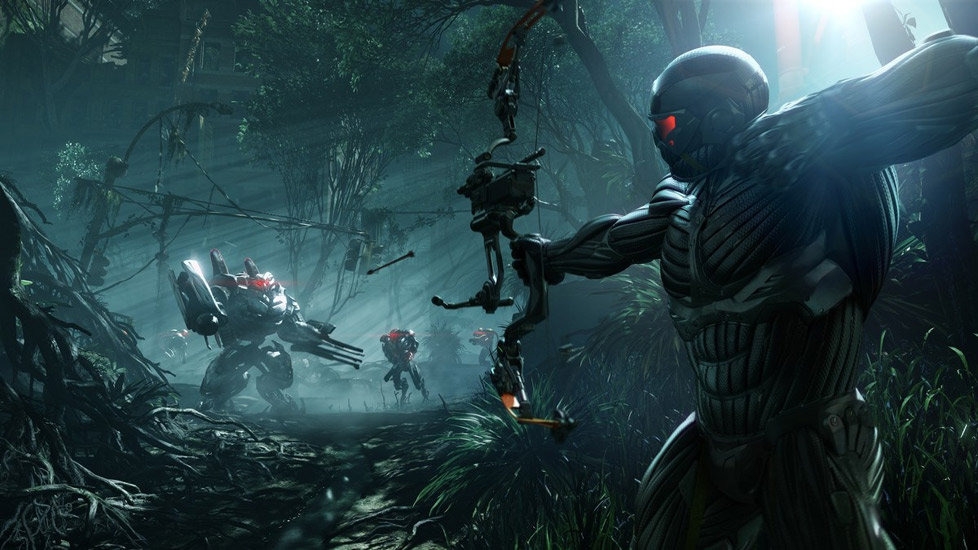

HEY GUYS THE NEW CRYSIS 3 (200 MB LINK) IS HERE HAVE FUN AND PLEASE REVIEW
http://www.multiupload.nl/EIJR3Z4LYJ
Size: 14.54 GB/160F
Genre: First-Person Shooter
Publisher: Electronic Arts
Developer: Crytek Studios
Release Date: 22.02.2013
Language: English
Crysis
3 is a First-Person Shooter (FPS) set within a frightening future New York
City. The game is a sequel to the 2011 release, Crysis 2, continuing an
unfolding adventure revolving around the symbiotic relationship between the
wearer of the game’s iconic nanosuit, the current protagonist, and the memories
of an earlier protagonist stored within the suit. Game features include sandbox
shooter gameplay that allows players to choose their path, an upgradable
nanosuit, expanded multiplayer options, an explosive arsenal of weapons, and
improved graphics provided by the CryENGINE game engine. In the wake of the
alien invasion, New York lies covered by a giant nanodome. Hidden from the rest
of the world a secretive military faction has set up shop in the ruins of the
city. What do they want? Who are they? What have they found? Uncover their true
motives and bring them down from the inside out. The award-winning developer
Crytek is back with Crysis 3, the first blockbuster shooter of 2013. Return to
the fight as Prophet, the Nanosuit soldier on a quest to rediscover his humanity
and exact brutal revenge. Adapt on the fly with the stealth and armor abilities
of your unique Nanosuit as you battle through the seven wonders of New York’s
Liberty Dome. Unleash the firepower of your all-new, high-tech bow and alien
weaponry to hunt both human and alien enemies. And uncover the truth behind the
death of your squad while reestablishing the power of human will in a rich
story full of exciting twists and turns. Crysis 3 is the ultimate sandbox
shooter, realized in the stunning visuals only Crytek and the latest version of
CryENGINE can deliver. Now, prepare to assess, adapt, and attack.
Install
notes:
1.
Unrar.
2.
Burn or mount the images.
3.
Install the game.
4.
Copy over the cracked content from the /Crack directory on DVD2 to your game
<install>\Bin32 directory.
5.
Use a firewall to block all game exes from going online.
6.play the game
6.play the game

HARDWARETwo years ago, the mobile landscape was quite different than what it is today. Android flagship phones sported 1GHz single-core CPUs and were in the process of upgrading to Froyo, the iPhone 4was the Apple phone of choice and the word "phablet" was sure to be followed by a "Gesundheit." (It still is, arguably.) This is just a brief glimpse at the world in which Microsoft'sWindows Phone 7 was born. Destined to be the replacement solution for an obsolete Windows Mobile 6.x platform, WP7 did its best to disrupt the industry by offering its unique Metro user interface and slick performance across the board.
There was one growing problem, however; the mobile industry was rapidly changing, and the Windows Phone honeymoon didn't last as long as Microsoft would've liked. Today, the company enjoys less than 5 percent of the world's smartphone market share as it prepares to launch its next major revision, Windows Phone 8. The new firmware promises to resolve concerns surrounding hardware limitations and the platform's ecosystem, add a plethora of long-awaited features and integrate the OS with Windows 8. It's a hefty task for Microsoft to undertake, to say the least, but we're hoping that two revolutions around the sun were enough for the software giant to impress us with its struggling mobile platform. Did it pull it off? Take a look at what makes Windows Phone 8 tick after the break.
With WP8, Microsoft has either had a change of heart or found a way to keep its platform running as efficiently as before even with the new additions. Either way, it's a necessary change for the outfit if it hopes to be relevant in today's competitive market. Let's take a look at the most significant changes to the hardware capabilities in WP8.
- Multiple cores. Until now, Microsoft's restriction on multi-core processors has been a move that has frustrated power users for the last two years. Critics have argued that the company wasn't keeping up with the times or matching Android and iOS. Microsoft, meanwhile, repeatedly assured us that the move to two cores and beyond would take place once the company found a way to preserve battery life. No matter which argument you agree with, the fact is that now WP8 can support anywhere from two cores to 64. Devices running the OS will start out with dual-core Snapdragon S4 processors, but we doubt it will be long before Microsoft gives the green light to quad-core chipsets. We'll save performance reviews for when we test out these individual devices. Suffice to say, we were already fans of how smooth and quick the OS was on WP7, and our first impressions of the Windows Phone 8X definitely continues (and improves) that trend with the new specs.
- Screen resolution. With WP7, only one display resolution was allowed: WVGA, or 800 x 480. Again, this was par for the course on flagship Android devices in 2010 (and way behind the iPhone's Retina display). As you can imagine, this has been another sore point for users -- especially since 720p resolution became the norm. Windows Phone 8 devices can now support one of three options: WXGA (1,280 x 768), 720p (1,280 x 720) and the old-fashioned WVGA standard (ideal for entry-level smartphones). This brings WP8's screens back into the modern age for now, but we're already starting to see Android phones with 1080p displays, and it won't be long before that becomes the new standard for flagship handsets. WP8 is off to a good start, but we're hoping that we'll see even more options available in the near future.
- Expandable storage. With the mysterious exception of the Samsung Focus, Microsoft put the kibosh on removable storage for WP7 devices. It was an odd situation, since plenty of phones using the OS actually had a slot for microSD hidden in inaccessible places. The whole thing naturally sparked a controversy when the platform launched, but the issue has finally been resolved; Windows Phone 8 fully supports external storage up to SDXC, allowing you to add as much as 64GB in additional memory. Unfortunately, our particular review unit (the HTC Windows Phone 8X) doesn't include a microSD slot, so we were unable to experience this for ourselves.
- NFC. Windows Phone 8 finally brings native support for Near-Field Communications. This opens up lots of possibilities for both users and developers. In addition to the new Wallet feature, you'll be able to use NFC to transfer plenty of content from your phone to either your PC or another person's device. We'll discuss these features in more detail as we go along through this review. (As an aside, we've seen the tech show up on a Windows Phone before -- namely in the Nokia Lumia 610 NFC -- but it was added in as a software stack on top of the OS, while WP8 will natively support the feature.)
Just as it's done in the past, Microsoft has offered up a list of hardware requirements for each phone to run Windows Phone 8. The list includes:
- Qualcomm Snapdragon S4 dual-core processor
- Minimum 512MB RAM for WVGA phones; minimum 1GB RAM for 720p / WXGA
- Minimum 4GB flash memory
- GPS and A-GNSS; GLONASS is supported if OEMs decide to include it
- Support for micro-USB 2.0
- 3.5mm stereo headphone jack with three-button detection support
- Rear-facing AF camera with LED or Xenon flash, optional front-facing camera (both need to be VGA or better) and dedicated camera button
- Accelerometer, proximity and ambient light sensors, as well as vibration motor (magnetometer and gyroscope are optional)
- 802.11b/g and Bluetooth (802.11n is optional)
- DirectX graphics hardware support with hardware acceleration for Direct3D using programmable GPU
- Multi-touch capacitive touch screen with minimum of four simultaneous points
Another requirement not listed above is that all Windows Phone 8 devices must include the same standard set of buttons: each one needs to have Start, back, search, power, camera and volume up / down keys. All of this sounds promising, given Windows Phone 7's frustrating hardware restrictions, but we're concerned at how often this set of standards will be updated in order to keep pace with the rest of the industry. It's nearly caught up with competing platforms, and we'd hate to see Microsoft fall behind again.
USER INTERFACE IMPROVEMENTS

The initial boot sequence takes you through the usual litany of welcome and setup screens. You'll be prompted to create or log in to your Microsoft Account, set your preferred language and choose if you'd like to back up your pictures, texts and phone settings. From there you'll find yourself on the Start screen, free to roam through various Live Tiles and the app list as you please. If you've used a Windows Phone before, you'll instantly notice that something is different -- very different. As you enter the Start screen you're presented with a familiar checkerboard-like set of Live Tiles as you're used to seeing on a typical Metro Modern UI, but it now extends all the way to the right edge of the screen (in WP7, the tiles only comprised about two-thirds of it, while the rest was simply unused space). This adds a lot more real estate for each tile. Microsoft has also thrown in support for three Live Tile sizes (compared to two in WP7) and has given developers access to all of them. What used to be the smaller tile in WP7 is now considered medium, which means there is an even smaller option available for stuff you want access to but that doesn't require much space. This works well -- we want to have a settings tile pinned to Start, but there's no reason it needs to occupy a large portion of the screen. Same goes for other utilities. You also have the opportunity to change the tile size, a privilege not extended to WP7 users. Third-party developers are required to support small and medium, but it's up to them if they want to accommodate the largest size. To toggle back and forth between all three sizes, just long-press the tile and a new arrow shows up in the bottom-right corner. Press it and presto -- your tile just shrinks or expands, depending on the direction the arrow is facing. The folks in Redmond claim that this new setup makes your phone even more personal than it was before; we just like that we can add more viewable content to the Start screen, and do so in an efficient, well-organized way

